#예제1
| 1 ~ 10 사이 난수가 짝수인지 홀수인지 출력 |
[기능]
package condition.ex;
import java.util.Scanner;

public class ConditionEx {
		Scanner sc = new Scanner(System.in);

        public void method1() {

		int ran = (int)(Math.random() * 10 + 1);
		if(ran % 2 != 1) {
			System.out.println("짝수 입니다.");

		}else {
			System.out.println("홀수 입니다.");
		}

	}
[실행]
package condition.run;

import condition.ex.ConditionEx;

public class ConditionRun {
	public static void main(String[] args) {
		ConditionEx ex = new ConditionEx();

		ex.method1();
       }
}
#결과

#예제2
|
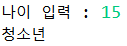
나이를 입력 받아
13세 이하 : 어린이 14세 이상 19세 이하 : 청소년 20세 이상 : 성인 구분하여 출력하기 |
[기능]
		public void method2() {

		System.out.print("나이 입력 : ");
	    int age = sc.nextInt(); // 필드 sc 이용

	    String result;

	    if (age <= 13 ) {
		result ="어린이";
	    }else if (age <= 19) {
		result = "청소년";
	    }else {
		result = "성인";
	    }
	    System.out.println(result);

		}
[실행]
package condition.run;

import condition.ex.ConditionEx;

public class ConditionRun {
	public static void main(String[] args) {
		ConditionEx ex = new ConditionEx();

		ex.method2();
       }
}
#결과
#예제3
|
나이를 입력 받아
13세 이하 : 어린이 14세 이상 19세 이하 : 청소년 - 14~16 : 청소년(중) - 17~19 : 청소년(고) 20세 이상 : 성인 0이하 또는 100 초과 : 잘못 입력하셨습니다 구분하여 출력하기 |
[기능]
public void method3() {

	System.out.print("나이 입력 : ");
		int age = sc.nextInt(); // 필드 sc 이용

		String result;

		if(age <= 0 || age > 100)  	result = "잘못 입력하셨습니다";
		else if(age <= 13)	result = "어린이";
		else if(age <= 19)  result = "청소년" + ((age<=16) ? "(중)" : "(고)");
		else result = "성인";

		System.out.println(result);
		}
[실행]
package condition.run;

import condition.ex.ConditionEx;

public class ConditionRun {
	public static void main(String[] args) {
		ConditionEx ex = new ConditionEx();

		ex.method3();
       }
}
#결과

#예제4
| 입력된 달(월)의 계절 출력하기 |
[기능]
public void method4() {
			System.out.print("달(월) 입력 : ");
			int month = sc.nextInt();

			String result;

			switch(month) {

			// case를 연속해서 작성하는 여러 방법

			// 1) 세로로 쭉
			case 3:
			case 4:
			case 5: result = "봄"; break;

			// 2) 가로로 쭉
			case 6: case 7: case 8: result = "여름"; break;

			// 3) case 값, 값, 값 형식
			case 9, 10, 11 : result = "가을"; break;

			case 12, 1, 2 : result = "겨울"; break;

			default : result = "잘못 입력";
			} // switch end
			System.out.println(result);
		}
[실행]
package condition.run;

import condition.ex.ConditionEx;

public class ConditionRun {
	public static void main(String[] args) {
		ConditionEx ex = new ConditionEx();

		ex.method4();
       }
}
#결과

#예제5
|
[성적 판별기]
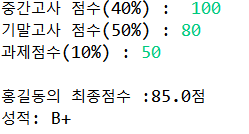
중간고사, 기말고사, 과제 점수를 입력 받아 - 중간고사(40%), 기말고사(50%), 과제(10%) - 입력 시 각각 100점 만점으로 입력 받음 - 합산된 점수에 따라 성적 부여 95점 이상 : A+ 90점 이상 : A 85점 이상 : B+ 80점 이상 : B 75점 이상 : C+ 70점 이상 : C 65점 이상 : D+ 60점 이상 : D 나머지 : F [실행 화면] 이름 : 홍길동 중간고사 점수 (40%) : 100 기말고사 점수 (50%) : 80 과제 점수(10%) : 50 최종 점수 : 85점 성적 : B+ |
[기능]
public void method5() {

			System.out.print("이름 : ");
			String name = sc.next();


			System.out.print("중간고사 점수(40%) : ");
			double  midTerm = sc.nextDouble();

			System.out.print("기말고사 점수(50%) : ");
			double  finalTerm = sc.nextDouble();

			System.out.print("과제점수(10%) : ");
			double  report = sc.nextDouble();

			double sum = (midTerm * 0.4) + (finalTerm * 0.5) + (report * 0.1);

			String result;
			System.out.println("최종점수 : " + sum);
			if (sum >= 95) { result = "A+";
			}else if (sum >= 90) {result = "A";
			}else if (sum>=85) {result = "B+";
			}else if (sum>=80) {result = "B";
			}else if (sum>=75) {result = "C+";
			}else if (sum>=70) {result = "C";
			}else if (sum>=65) {result = "D+";
			}else if (sum>=60) {result = "D";
			}else {result = "F";}

			System.out.println(); // 줄바꿈
			System.out.println(name + "의 최종점수 :" + sum + "점");

			System.out.println(" 성적: " + result);

			}
[실행]
package condition.run;

import condition.ex.ConditionEx;

public class ConditionRun {
	public static void main(String[] args) {
		ConditionEx ex = new ConditionEx();

		ex.method5();
       }
}
#결과
#예제6
|
국어, 영어, 수학, 사탐, 과탐 점수를 입력 받아
40점 미만 과목이 있으면 FAIL 평균이 60점 미만인 경우도 FAIL 모든 과목 40점 이상, 평균 60점 이상인 경우 PASS [출력 예시] 점수 입력(국 영 수 사 과) : 100 50 60 70 80 1) 40점 미만 과목이 존재하는 경우 FAIL [40점 미만 과목 : 국어 영어] 2) 평균 60점 미만인 경우 FAIL [점수 : 50.4 (평균 미달)] 3) PASS인 경우 PASS [점수 : 83.4 / 100] |
[기능]
public void practicce() {
			System.out.print("점수 입력(국 영 수 사 과) : ");

			int kor = sc.nextInt(); // 국
			int eng = sc.nextInt(); // 영
			int mat = sc.nextInt(); // 수
			int soc = sc.nextInt(); // 사
	 		int sci = sc.nextInt(); // 과


	 		// 40점 미만인 과목 검사
	 		boolean flag = false;
	 		String str = ""; //빈칸(자료형 : String, 내용X)

	 		if(kor < 40) {
	 			flag = true;
	 			str += "국어 ";
	 		}
	 		if(eng < 40) {
	 			flag = true;
	 			str += "영어 ";
	 		}
	 		if(mat < 40) {
	 			flag = true;
	 			str += "수학 ";
	 		}
	 		if(soc < 40) {
	 			flag = true;
	 			str += "사회 ";
	 		}
	 		if(sci < 40) {
	 			flag = true;
	 			str += "과학 ";
	 		}
	 		// 40점 미만 과목이 존재하는 경우
	 		if(flag) {
	 			System.out.printf("FAIL [40점 미만과목 : %s]", str);
	 			return;
	 		}

	 	   // 평균 (double형 결과를 반환 받기 위해 5.0으로 나눔)
	 	   double avg =(kor + eng + mat + soc + sci) / 5.0 ;
	 	   if(avg < 60) {
	 			System.out.printf("FAIL[점수 : %.1f (평균 미달)]", avg);
	 			return; //Early return; (중간에 메서드 종료)
	 	   }
	 			System.out.printf("PASS [점수 : %.1f / 100]", avg);

}
[실행]
package condition.run;

import condition.ex.ConditionEx;

public class ConditionRun {
	public static void main(String[] args) {
		ConditionEx ex = new ConditionEx();

		ex.practice();
       }
}
#결과

#swich를 이용한 메서드 호출
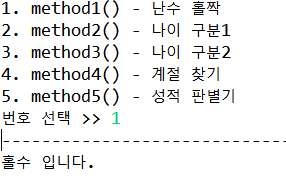
public void displayMenu() {
			System.out.println("1. method1() - 난수 홀짝");
			System.out.println("2. method2() - 나이 구분1");
			System.out.println("3. method3() - 나이 구분2");
			System.out.println("4. method4() - 계절 찾기");
			System.out.println("5. method5() - 성적 판별기 ");

			System.out.println("번호 선택 >> ");
			int num = sc.nextInt();
			System.out.println("--------------------------------------------------------------------");

			switch(num) {
			case 1 : method1() ; break; // 1 입력 시 method1() 호출

			case 2 : method2() ;break;

			case 3 : method3() ;break;
			case 4 : method4(); break;

			case 5 : method5(); break;
			default: System.out.println("잘못 입력 하셨습니다.");
			}

		}
[기능]
package condition.run;

import condition.ex.ConditionEx;

public class ConditionRun {
	public static void main(String[] args) {
		ConditionEx ex = new ConditionEx();

		ex.displayMenu();
       }
}
#결과
'BackEnd > Java' 카테고리의 다른 글
| [Java]Control 조건문(Loop2) (0) | 2024.07.21 |
|---|---|
| [Java]Control 조건문(Loop1) (0) | 2024.07.21 |
| [Java]Operator (0) | 2024.07.21 |
| [Java]변수 실전예제2 (2) | 2024.07.21 |
| [JAVA]01_변수 실전예제1 (0) | 2024.07.20 |