▶ 범위별 객체에 세팅된 값(속성) 얻어오기
- 제출된 파라미터 얻어오는 EL : \${param.key}
- 범위별 객체에 세팅된 값 얻어오는 EL
1) \${OOOScope.key} ex) \${requestScope.key}
2) \${key}
-> 좁은 범위 객체부터 탐색하여
일치하는 key가 있으면 얻어옴
#예제1
[jsp]
 <h1>
    <a href="/el/scope">Servlet/JSP 범위(scope)별 내장 객체
    + EL 사용법</a>
  </h1>
[servlet]
package edu.kh.jsp2.controller;

import java.io.IOException;

import jakarta.servlet.RequestDispatcher;
import jakarta.servlet.ServletContainerInitializer;
import jakarta.servlet.ServletContext;
import jakarta.servlet.ServletException;
import jakarta.servlet.annotation.WebServlet;
import jakarta.servlet.http.HttpServlet;
import jakarta.servlet.http.HttpServletRequest;
import jakarta.servlet.http.HttpServletResponse;
import jakarta.servlet.http.HttpSession;

// 주소 제일 앞에 "/" 꼭 작성!!
// -> 서블릿 매핑에서 유효하지 않은 <url=pattern> [el/scope] 오류 발생
@WebServlet("/el/scope")
public class ELTestServlet2 extends HttpServlet {

	// a태그 요청은 GET 방식
	@Override
	protected void doGet(HttpServletRequest req, HttpServletResponse resp) throws ServletException, IOException {
	/*요청 처리*/
		// 1. page scope -> JSP 에서만 확인 가능

		// 2. request scope
		// - 요청 받은 Servlet/JSP와
		//    요청이 위임된 Servlet/JSP에서 유지되는 객체

		// * Servlet/JSP 범위 객체에
		// 1.  값(속성) 추가하는 방법
		// 범위객체.setAttribute("key", value);

		// 2.  값(속성) 얻어오는 방법
		// Object 범위객체.getAttribute("key");
		// -> 반환형 Object -> 필요 시 다운캐스팅

		req.setAttribute("requestValue", "request scope 객체에 세팅한 값");

		System.out.println(req.getAttribute("requestValue"));
		//------------------------------------------
		// 3. session(입회, 접속) scope
		// - 클라이언트가 서버에 첫 요청 시
		//  서버쪽에 생성되는 객체

		// - 클라이언트가 브라우저를 종료하거나
		// 지정된 세션 만료 시간이 지나면 사라짐
		// -> 위 상황이 아니면 계속 유지되는 객체

		// 1) session scope 객체 얻어오기
		HttpSession session = req.getSession();

		// 2) session scope 객체에 값 세팅
		session.setAttribute("sessionValue", "session scope 객체에 세팅한 값");

		/*session 만료시키기*/
		session.setMaxInactiveInterval(1800); // 초단위


		//=========================================

		//4. application scope
		// - 서버 전체에 1개만 존재하는 객체
		// -> 모든 클라이언트가 공유

		// - 서버 시작 시 생성, 서버 종료 시 소멸

		// 1) application scope 객체 얻어오기
		ServletContext application = req.getServletContext();

		// 2) 값 세팅
		application.setAttribute("applicationValue", "application scope 객체에 세팅한 값");

		//====================================

		// 5. 범위별 우선순위 확인
		// (좁은범위가 우선순위가 높다!!)
		// page > request > session > application

		req.setAttribute("menu", "짬뽕(request)");
		session.setAttribute("menu", "짜장(session)");
		application.setAttribute("menu", "볶음밥(application)");
		//------------------------------------------
		/*응답 처리*/
		String path = "/WEB-INF/views/el/scope.jsp";
		RequestDispatcher dispatcher = req.getRequestDispatcher(path);

		dispatcher.forward(req, resp);


	}
}
[jsp]
<%@ page language="java" contentType="text/html; charset=UTF-8" pageEncoding="UTF-8"%>
<!DOCTYPE html>
<html lang="ko">
<head>
  <meta charset="UTF-8">
  <meta name="viewport" content="width=device-width, initial-scale=1.0">
  <title>Servlet/JSP 범위별 내장 객체</title>
</head>
<body>

  <h3>범위별 객체에 세팅된 값(속성) 얻어오기</h3>

  <pre>
    - 제출된 파라미터 얻어오는 EL : \${param.key}

    - 범위별 객체에 세팅된 값 얻어오는 EL
      1) \${OOOScope.key}    ex) \${requestScope.key}

      2) \${key}
        -> 좁은 범위 객체부터 탐색하여
           일치하는 key가 있으면 얻어옴
  </pre>

  <ul>
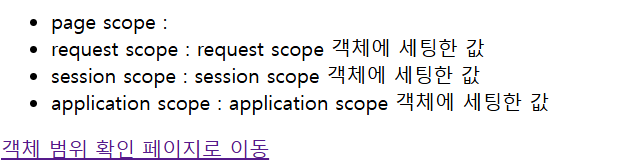
    <li>page scope        : </li>

    <li>request scope     : ${requestValue}</li>

    <li>session scope     : ${sessionValue}</li>

    <li>application scope : ${applicationValue}</li>

  </ul>

 <a href="/el/check">객체 범위 확인 페이지로 이동</a>

<hr>
<h1>범위별 객체 우선순위 확인</h1>
<%
  // page scope 객체에 값 세팅
  pageContext.setAttribute("manu", "짬짜면(page)");
%>
<h3>menu : ${menu}</h3>

<hr>
<h3>원하는 scope의 세팅된 값 얻어오기</h3>
<ul>
  <li>pageScope.manu : ${pageScope.menu}</li>
  <li>requestScope.menu : ${requestScope.menu}</li>
  <li>sessionScope.menu " ${sessionScope.menu}</li>
  <li>applicationScope.menu " ${applicationScope.menu}</li>
</ul>

</body>
</html>
#결과


'BackEnd > Java' 카테고리의 다른 글
| [Servlet/JSP]JSTL 예제 (책 목록 조회하기) (0) | 2024.08.16 |
|---|---|
| [Servlet/JSP]JSTL / 조건문 / 향상된 for문 (0) | 2024.08.16 |
| [Servlet/JSP]EL/JSTL (0) | 2024.08.16 |
| [Servlet/JSP]Servlet을 이용해 서버 요청 보내기 (0) | 2024.08.16 |
| [Servlet/JSP] Servlet을 이용한 예제 (0) | 2024.08.16 |