1. 예외 처리란?
- Exception(예외)
코드로 해결 가능한 에러
(if, try-catch, throws 등)
- Exception Handling(예외 처리)
예외 발생 시 이를 처리하는 구문 (try-catch, throws)
1) 에러의 종류
| 컴파일 에러 | 프로그램의 실행을 막는 소스 코드상의 문법 에러. 소스 코드 수정으로 해결. |
| 런타임 에러 | 프로그램 실행 중 발생하는 에러. 대부분 if문 사용으로 에러 처리 가능 (ex. 배열의 인덱스 범위를 벗어났거나, 계산식의 오류) |
| 시스템 에러 | 컴퓨터 오작동으로 인한 에러, 소스 코드 수정으로 해결 불가 |
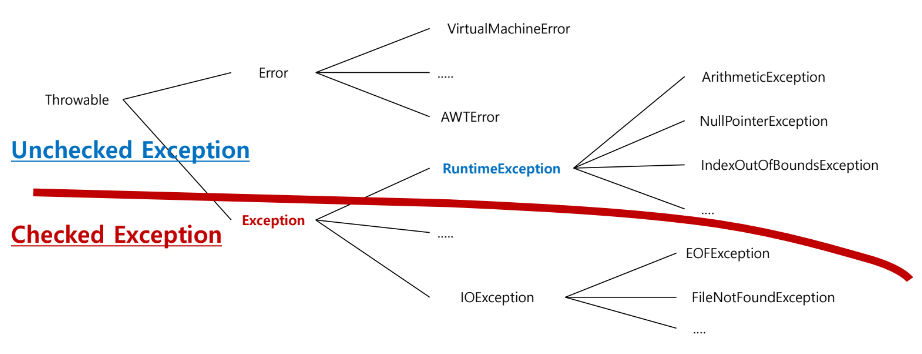
2) 예외 클래스 계층구조
Exception과 Error 클래스 모두 Object 클래스의 자손이며
모든 예외의 최고 조상은 Exception 클래스
반드시 예외 처리해야 하는 Checked Exception과 해주지 않아도 되는 Unchecked Exception으로 나뉨
[Unchecked]
- NullPointerException
참조하고 있는 객체가 없는데
객체의 필드/메서드를 호출할 때 던져지는 예외
- ArrayIndexOutOfBoundsException
배열의 index 범위를 초과한 경우 던져지는 예외
- InputMismatchException
스캐너 입력 시 next자료형()으로 읽어오는 값과
입력된 값의 자료형이 일치하지 않을 때
3) Java에서 에러/예외를 발생 시키는 방법
ex)
중간에 잘못된 코드가 수행된 경우
String str = null; str.split("/");
→ JVM이 new NullPointException(); 구문을 수행
→ 만들어진 예외 객체를 던짐
예외처리 구문이 없을 시 "프로그램 종료"
예외처리 구문이 있을 시 "처리 후 정상수"
4) 예외 처리 방법
(1) Exception이 발생한 곳에서 직접 처리 → try~catch문 이용
| try | Exception 발생할 가능성이 있는 코드를 안에 기술 |
| try | try애서 던져진 예외를 ()에 작성된 참조 변수로 잡아서 처리 여러 개의 Exception 처리가 가능하나 Exception간의 상속 관계 고려해야 함 |
| finally | Exception 발생 여부와 관계없이 꼭 처리해야 하는 로직 기술 중간에 return문을 만나도 finally구문은 실행되지만 System.exit();를 만나면 무조건 프로그램 종료 주로 java.io나 java.sql 패키지의 메소드 처리 시 이용 |
* e.printStackTrace()
예외 발생 원인, 발생된 메서드 추적결과를 콘솔에 출력하는 메서드
--> 원래 예외 발생하면 나타나는 구문
* String e.getMessage();
예외 원인이 작성된 message를 문자열로 반환
#예제 1 Unchecked Exception
package pkg1.service;

import java.util.InputMismatchException;
import java.util.Scanner;

public class TryCatchService {

	private Scanner sc = new Scanner(System.in);

	/**
	 * 고의적으로 예외를 발생시키드 코드 작성
	 */
	public void test1() {

		// NullPointerException
		// -> 참조하고 있는 객체가 없는데
		//  객체의 필드/메서드를 호출할 때 던져지는 예외

		//String str = null;
		//str.split("/");

		//ArrayIndexOutOfBoundsException
		// - 배열의 index 범위를 초과한 경우 던져지는 예외
		// int[] arr = new int[3]; // index : 0 1 2
		// arr[5] = 10;

		//InputMismatchException
		// - 스캐너 입력 시
		//   next자료형()으로 읽어오는 값과
		//   입력된 값의 자료형이 일치하지 않을 때

	   System.out.print("정수 입력 : ");
	   int input = sc.nextInt(); // 콘솔 입력 시 문자열/실수/ 값의 범위 초과 입력

	}
#예제2
[service]
	public void test2() {

		try {
			System.out.print("정수 입력 1 : ");
			int num1 = sc.nextInt();

			System.out.print("정수 입력 2 : ");
			int num2 = sc.nextInt();

			System.out.println("합계 : " + (num1 + num2));

	      } catch(InputMismatchException e) {
	    	  // try에서 던져지게 함
	    	  // InputMismatchException 객체를 잡아서 처리하는 구문

	    	  System.out.println("정수만 입력 해줘 ㅜㅜㅜ");

	    	  // 발생된 예외를 처리했기 때문에
	    	  // 어떤 이유로 어디서 무슨 예외가 발생했는지
	    	  // 콘솔에 빨갛게 뜨는 stackTrace 구문이 출력되지 않음

	    	  /* e.printStackTrace()
	    	   * - 예외 발생 원인, 발생된 메서드 추적결과를
	    	   * 	콘솔에 출력하는 메서드
	    	   * --> 원래 예외 발생하면 나타나는 구문
	    	   */
	    	  e.printStackTrace();

	    	  /* String e.getMessage();
	    	   * - 예외 원인이 작성된 message를 문자열로 반환
	    	   */
	    	  System.out.println(e.getMessage());

	}
}
#결과

#예제3
[service]
public void test3() {

		try {
			System.out.print("정수 입력 1 : ");
			int num1 = sc.nextInt();

			System.out.print("정수 입력 2 : ");
			int num2 = sc.nextInt();

			System.out.println("몫 : " + (num1 / num2));
			// -> InputMismatchException만 처리한 경우
			//   0으로 나누었을 때 발생하는
			//  ArithmeticException(산술적 예외)를 처리하지 못하여
			//  프로그램이 강제 종료되는 문제 발생

		}catch(InputMismatchException e) {
			System.out.println("int 범위 정수만 입력해 주세요");
		}catch(ArithmeticException e) {
			// 앞에서 처리하지 못한 산술적 예외를 잡아서 처리
			System.out.println("0으로 나눌 수 없습니다.");
		}


		// 발생된 예외를 처리했기 때문에 수행될 수 있는 구문
		System.out.println(">>>프로그램 종료<<<");
	}
#결과

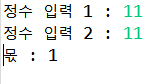
예제4 예외처리 + 다형성(업 캐스팅)
[service]
	public void test4() {

		try {
			System.out.print("정수 입력 1 : ");
			int num1 = sc.nextInt();

			System.out.print("정수 입력 2 : ");
			int num2 = sc.nextInt();

			System.out.println("몫 : " + (num1 / num2));

		}
		// 자식 타입 예외를 먼저 처리(if)
		//-> 부모 타입을 나머지 예외를 처리하는 (else) 형식으로 사용
		catch(InputMismatchException e) {
			System.out.println("int 범위 정수만 입력해줘");
		}

		catch (RuntimeException e) {

			// catch에 매개 변수 타입을 부모 타입으로 설정!!!
		    // -> 던져지는 모든 자식 타입의 예외를 잡아서 처리
			// -> 예외 처리에 다형성(업 캐스팅) 적용

			// 장점 : 여러 예외처리 구문을 작성하지 않고도
			//           예외 처리가 가능

			// 단점 : 발생하는 예외별 처리 방법을 제시할 수 없다
			System.out.println("뭔지 모르겠지만 예외 발생");
		}
			//InputMismatchException에 빨간줄(컴파일 에러)이
			// 발생하는 이유 :
			//  -> 앞에서 부모 타입 참조 변수를 이용해
			//   자식 타입 예외를 잡아서 처리했기 때문에
			//   도달할 수 없는 코드(dead code)가 되어버림

			// 해결 방법 : 부모 처리 구문 보다 앞에 작성하면 해결!
//		}catch(InputMismatchException e) {
//			System.out.println("int 범위 정수만 입력해줘");
//		}
//

	}
#결과
#예제
[service] catch문 + 다형성
public void test5() {

		// Exception 클래스 : 모든 예외의 최상위 부모

		System.out.println("---던질 예외 선택---");

		System.out.println("1.  Exception");
		System.out.println("2.  RuntimeException");
		System.out.println("3. ArithmeticException");
		try {
			int input = sc.nextInt();

			switch(input) {
			case 1 : throw new Exception();
			case 2 : throw new RuntimeException();
			case 3 : throw new ArithmeticException();

			}
		} catch(InputMismatchException e) {
			System.out.println("int 정수만 입력해 주세요");

		} catch(ArithmeticException e) {
			System.out.println("ArithmeticException 예외 처리 완료");

		} catch(RuntimeException e) {
		 	System.out.println("RuntiomeException 예외 처리 완료");

		} catch(Exception e) {
			System.out.println("Exception 예외 처리 완료");
		}
	}
#결과

'BackEnd > Java' 카테고리의 다른 글
| [Java]예외처리(Exception) throw와 throws 구분하기 (0) | 2024.08.12 |
|---|---|
| [Java]예외처리(Exception) try~catch문 예제 (0) | 2024.08.12 |
| [Java]컬렉션(collection) StringBuilder / StringBuffer (0) | 2024.08.12 |
| [Java]컬렉션(collection) String 불변성 (0) | 2024.08.12 |
| [Java]컬렉션(collection) Map (0) | 2024.08.12 |